> For the complete documentation index, see [llms.txt](https://docs.catfee.io/llms.txt). Markdown versions of documentation pages are available by appending `.md` to page URLs; this page is available as [Markdown](https://docs.catfee.io/en/solutions/sweep-assist.md).

# Sweep Assist

Sweep Assist is CatFee's automated energy top-up service for TRON multi-address collection, USDT consolidation, and hot wallet operations.

When your receiving addresses meet the collection conditions, CatFee tops up TRON Energy for the target addresses based on your predefined rules, helping your USDT transfer or collection scripts run more reliably. Sweep Assist only provides energy top-ups. It does not access private keys, does not custody wallets, and does not transfer USDT, TRX, or any other assets on your behalf.

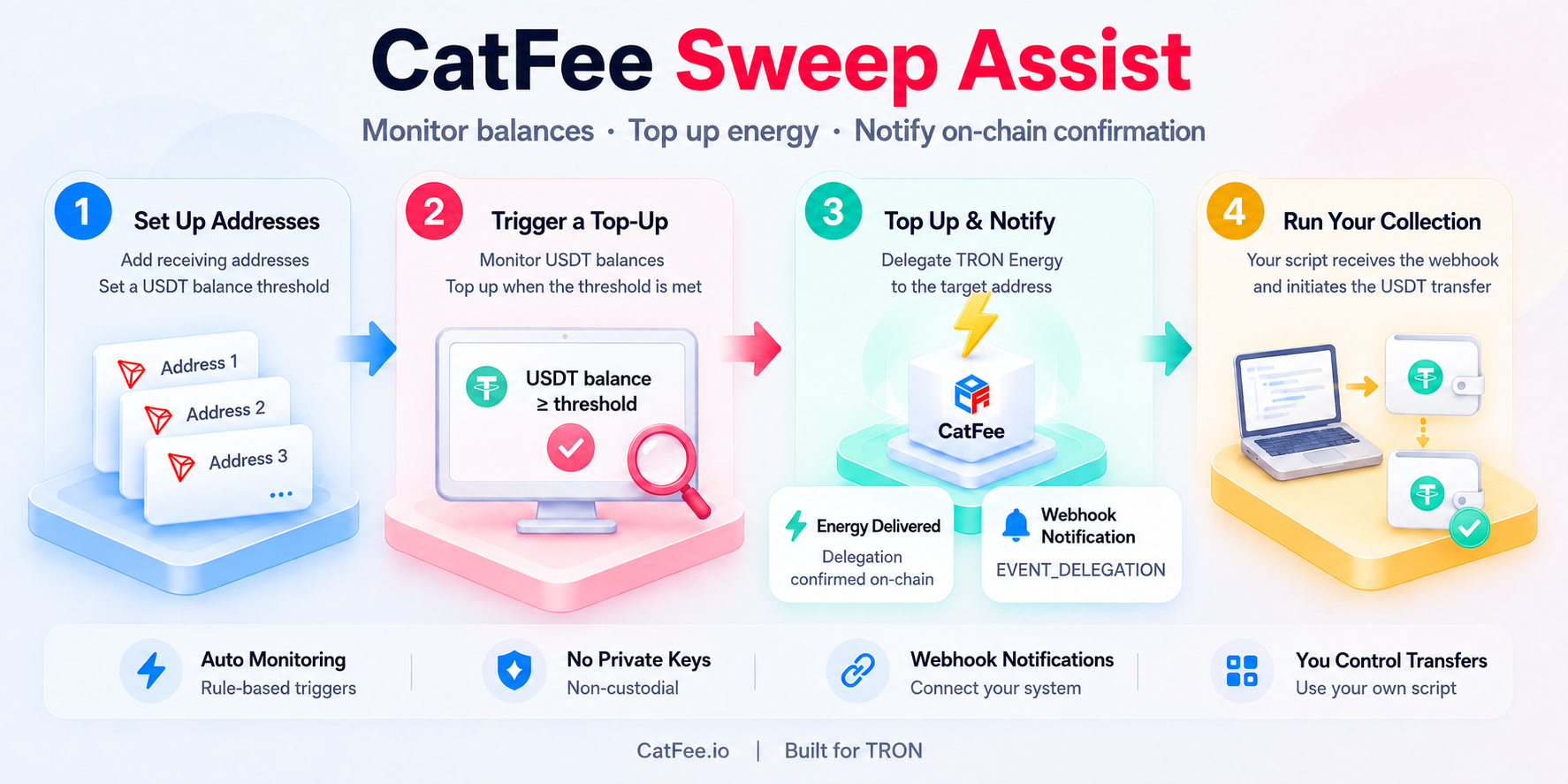
<figure><img src="https://4164384423-files.gitbook.io/~/files/v0/b/gitbook-x-prod.appspot.com/o/spaces%2Fa332YYkbT2p9snj9atS0%2Fuploads%2Fgit-blob-0246c9eb356a3ecb985a15c12fa979d3942b3aa0%2Fsweep-assist-workflow-en-v2.png?alt=media" alt="Sweep Assist workflow: configure receiving addresses, trigger an energy top-up when the USDT balance threshold is met, receive a Webhook after on-chain confirmation, and initiate the USDT collection from your own system."><figcaption><p>CatFee monitors addresses, tops up energy, and sends notifications. You complete asset collection using your own wallet or script.</p></figcaption></figure>

## Who Should Use It

Sweep Assist is designed for users who manage multiple TRON receiving addresses and want to reduce the operational cost of manual energy top-ups, constant monitoring, and failed collections.

**Merchant Collection**

Suitable for multi-address collection scenarios such as e-commerce, payment teams, and OTC merchants. After multiple receiving addresses gradually receive USDT, the system can automatically top up energy once the collection threshold is reached, reducing delays caused by manual energy checks and manual top-ups.

**Wallet and Exchange Operations**

Suitable for wallets, exchanges, and treasury operations teams. Hot wallet management, deposit address handling, and internal address pool collection often require stable execution. Sweep Assist helps operations teams retain top-up records, fee records, and failure statuses for later reconciliation.

**DApps and On-Chain Tools**

Suitable for developers building payment tools, on-chain tools, and internal systems. When business addresses do not maintain stable energy availability, user transfers may fail, and building an in-house monitoring and top-up system increases development and maintenance costs. Sweep Assist can serve as the address monitoring and energy execution layer, reducing integration complexity.

**High-Frequency Small-Value Receipts**

Suitable for individuals or small teams managing a large number of small-value receiving addresses. When the number of addresses grows, checking balances and energy status one by one becomes inefficient. Rule-based energy top-ups reduce repetitive operational work.

> **Already have your own collection script?**
>
> In most cases, no major changes are required. Sweep Assist can sit in front of your existing collection workflow as an energy assurance layer: CatFee handles the energy top-up when a rule is triggered, while the actual collection transfer is still initiated by your wallet, script, or business system.

## Core Capabilities

* **Rule-based monitoring**: Configure trigger conditions by address pool, such as a USDT balance reaching a specified threshold.
* **Batch address management**: Manage multiple receiving addresses under one rule and add or remove addresses later as needed.
* **Automatic energy top-up**: Top up TRON Energy for target addresses after a rule is triggered, reducing the risk of failed USDT transfers caused by insufficient energy.
* **Webhook notifications**: Notify your business system after the energy delegation is confirmed on-chain, so you can continue your collection script or notify customers.
* **Budget control**: Control costs through rule enablement, per-top-up energy amount, and budget limits.
* **Execution records**: Each top-up generates a record with the target address, energy amount, fee details, and execution status for operational review and financial reconciliation.
* **Non-custodial design**: No private keys required, no wallet control, and no asset transfers on your behalf.

## Workflow

### 1. Create a Collection Energy Rule

Create a collection energy top-up rule in the CatFee Dashboard. First configure the base rule, then add the receiving addresses you want to monitor.

Common settings include:

* **Balance Threshold**: The system triggers a top-up when the monitored address has a USDT balance greater than or equal to this threshold. For example, setting it to `10` means the top-up is triggered once the address balance reaches 10 USDT.
* **Energy Quantity**: The amount of energy to top up each time the rule is triggered. The minimum is 65,000 Energy, and you can configure it based on your collection transfer requirements.
* **Bandwidth Protection**: When enabled, the system reserves bandwidth to reduce the risk of a failed collection transfer caused by insufficient bandwidth.
* **Remark**: A label for the rule's purpose, such as primary wallet collection, merchant address pool, or a specific business line.

After creating the rule, you still need to add the monitored addresses. If a newly added address has not been activated yet, the system will activate it automatically and charge the address activation fee shown in the Dashboard.

### 2. Import Receiving Addresses

Import the TRON receiving addresses you want to monitor into the rule. Addresses can be grouped by business line, merchant, wallet address pool, or collection batch.

After import, the system continuously checks the status of these addresses. You can also add, remove, or adjust addresses as your business changes.

### 3. Continuous Monitoring

After the rule is enabled, CatFee continuously checks whether an address meets the trigger conditions. For example:

* The address USDT balance reaches 30 USDT, 100 USDT, or another custom threshold.
* The address enters an operational state that requires collection.
* A specific address in the pool matches the top-up rule.

At present, the primary trigger condition is address balance. Additional trigger methods, such as scheduled triggers, manual triggers, or combined rules, depend on the actual capabilities available in the Dashboard.

### 4. Automatic Top-Up After a Rule Match

When an address meets the conditions, the system tops up TRON Energy according to the rule. After a rule is triggered, the top-up is typically executed within one TRON block, which is usually around 3 seconds.

Once the top-up is complete, your collection script, wallet operations, or internal system can proceed with the USDT collection transfer.

To automate the next step, subscribe to the `EVENT_DELEGATION` event and receive a [Webhook notification](#webhook) after the energy delegation is confirmed on-chain.

### 5. Review Records and Fees

Each top-up generates an execution record that typically includes:

* Execution time
* Target address
* Energy amount
* Top-up fee
* Transaction hash or execution status
* Result details such as success, failure, or insufficient balance

No top-up order is created before a rule is triggered. Failed top-ups are not billed, and the failure status remains in the records for troubleshooting balances, rules, addresses, or network conditions.

## Webhook Top-Up Notifications <a href="#webhook" id="webhook"></a>

After Sweep Assist delegates energy to a target address and the delegation is confirmed on-chain, CatFee can send an `EVENT_DELEGATION` (Delegation Confirmed) event to your configured callback URL via HTTP `POST`. Your business system can use this notification to tell customers that energy has arrived or continue an existing USDT collection script.

### Setup and Processing Flow

1. Go to **User Center → API Settings**, enter your `callbackUrl`, and subscribe to `EVENT_DELEGATION`. HTTP and HTTPS callback URLs are supported. Subscriptions must be configured on this page; dynamic subscription through the API is not supported.
2. Receive the JSON callback, identify `EVENT_DELEGATION` using the `X-EVENT-TYPE` request header, and check that `data.resource_type` is `ENERGY` to distinguish energy notifications from bandwidth notifications.
3. Use `data.receiver` to match a receiving address you manage and its customer. Check your pending collection records before notifying the customer or starting the next collection step.
4. Use `X-EVENT-ID` as an idempotency key to avoid duplicate customer notifications or collection attempts. Return `HTTP 200` after successfully receiving and processing the event. Return `200` for events already processed as well; otherwise, the platform will retry the notification.

### Key Callback Fields

The following fields appear in the request body's `data` object:

| Field                  | Description                                                                       |
| ---------------------- | --------------------------------------------------------------------------------- |
| `resource_type`        | Resource type: `ENERGY` for energy or `BANDWIDTH` for bandwidth                   |
| `receiver`             | Address receiving the energy, used to identify the receiving address and customer |
| `quantity`             | Amount of resources delegated                                                     |
| `delegation_hash`      | Delegation transaction hash, used to verify the on-chain transaction              |
| `delegation_timestamp` | Delegation time                                                                   |

{% hint style="info" %}
`EVENT_DELEGATION` confirms that an energy or bandwidth delegation is on-chain. It does not mean that USDT collection is complete. Your wallet, script, or business system still initiates the asset transfer.
{% endhint %}

See the [Webhook documentation](/en/getting-started/webhook.md) for the complete event structure, field definitions, request headers, and retry policy.

## Configuration Examples

The examples below are for reference only. Actual configuration options and pricing are subject to what is shown in the CatFee Dashboard.

| Scenario              | Trigger Condition                                  | Top-Up Strategy                             | Address Scope  | Balance Requirement                              |
| --------------------- | -------------------------------------------------- | ------------------------------------------- | -------------- | ------------------------------------------------ |
| Small-value receipts  | USDT balance >= 30                                 | Custom energy amount, minimum 65,000 Energy | 32 addresses   | Ensure the CatFee account has sufficient balance |
| Merchant collection   | USDT balance >= 100                                | Custom energy amount, minimum 65,000 Energy | 128 addresses  | Ensure the CatFee account has sufficient balance |
| Hot wallet operations | Business balance reaches the operational threshold | Custom energy amount, minimum 65,000 Energy | 500+ addresses | Ensure the CatFee account has sufficient balance |

## Fees and Controls

Sweep Assist is billed based on successful energy top-up executions. No top-up order is created before a rule is triggered, and no new top-up orders are generated while a rule is paused.

You can control costs in the following ways:

* **Pause rules**: Pause a rule directly when operations change, a campaign ends, or budgets tighten.
* **Control the top-up amount per execution**: Choose an appropriate energy amount based on the transfer type and avoid over-provisioning.
* **Review execution records**: Reconcile costs using the target address, energy amount, and fee details.
* **Monitor account balance**: When your account balance is insufficient, the Dashboard displays a low-balance warning. Recharge in time to avoid interrupting the collection workflow.

## Security Boundaries

Sweep Assist only handles energy preparation. It does not perform asset collection itself.

| Boundary                         | Description                                                                                                      |
| -------------------------------- | ---------------------------------------------------------------------------------------------------------------- |
| No private key required          | CatFee does not ask users to submit private keys and does not require wallet custody                             |
| No asset transfer on your behalf | CatFee only tops up TRON Energy and does not initiate transfers of USDT, TRX, or any other assets for users      |
| User retains control             | Users can pause, modify, or delete rules at any time, and can also adjust the address list and top-up strategy   |
| Auditable records                | Top-up results and fee details can be used for operational review, financial reconciliation, and troubleshooting |

## Operational Recommendations

1. Organize the receiving addresses you need to monitor and group them by business line or use case.
2. Set USDT balance thresholds based on your collection strategy. For example, use a lower threshold for small-value receipts and a higher threshold for merchant collection.
3. Choose the energy amount based on the target transfer type, such as 65,000 Energy or 131,000 Energy.
4. Set budget limits and balance alerts to avoid failed top-ups caused by insufficient account balance.
5. Start with a small set of addresses to validate the rule, then gradually expand to the full address pool.
6. Export or review execution records regularly for operational analysis and cost reconciliation.

## FAQ

### What is Sweep Assist?

Sweep Assist is CatFee's automated energy top-up capability for multi-address USDT collection and fund consolidation scenarios. After users configure monitored addresses, balance thresholds, and top-up rules, the system tops up TRON Energy for target addresses when the collection conditions are met, reducing the risk of failed or interrupted USDT transfers caused by insufficient energy.

### Does CatFee control my wallet?

No. Sweep Assist is a non-custodial service. It does not require private keys and does not control wallet permissions. CatFee only tops up TRON Energy for the target address when a rule is triggered.

### Will CatFee automatically collect my USDT after the energy top-up?

No. Sweep Assist only solves the TRON Energy preparation step. It does not move assets. After the top-up is completed, the USDT collection transfer is still initiated by your wallet operations, collection script, or internal system.

### Under what conditions is energy topped up automatically?

Energy is topped up automatically when a configured TRON address meets the trigger conditions, such as reaching a specified USDT collection threshold. You can configure the monitoring conditions and top-up strategy in the Dashboard.

### How long does the top-up take?

After a rule is triggered, the system typically executes the top-up within one TRON block, usually about 3 seconds. Once the energy arrives, your USDT collection script or transfer workflow can continue.

### What happens if the top-up fails?

If an automatic top-up fails, the system records the failure status and shows the execution result in the Dashboard, making it easier to troubleshoot address issues, balances, rules, or network conditions. Failed top-ups are not billed.

### Does it support batch address import?

Yes. Sweep Assist is suitable for merchants, wallets, and exchanges that manage a large number of TRON receiving addresses. You can batch import an address list through the Dashboard and apply a unified top-up rule.

### Can I modify or delete a rule at any time?

Yes. You can pause, modify, or delete a collection energy rule at any time. You can also adjust the address list, USDT balance threshold, and top-up amount. When a rule is paused, no new top-up orders are created.

### I already have a collection script. Do I still need to modify it?

Usually not. CatFee Sweep Assist can act as an energy assurance layer in front of your existing USDT collection workflow. After the energy top-up is completed, the collection can continue through your original script, wallet, or internal system. If you need API integration, contact CatFee technical support to confirm the implementation approach.
